Ads 468x60px

Sabtu, 27 Oktober 2012

TUGAS 3

MEMODIFIKASI PROGRAM PENJUALAN


1.

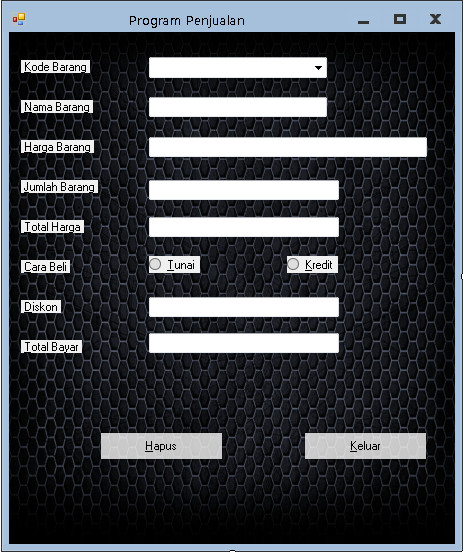
a) Saat form dijalankan : semua isian tidak aktif, tombol isidata dan tutup aktif, tombol clear tidak aktif
b) Saat ditekan tombol isi data : kodebarang, jumlahbarang, cara beli, tombol clear, aktif, tombol isidata tidak aktif
c) Saat ditekan combol clear sama dengan saat form dijalankan.

jawab:
 1. Buka program yang kmarin dibuat


tambahkan button lalu rename agar manjadi seperti ini:


berikut ini adalah listing programnya :


listing pada form:

Dim control As Windows.Forms.Control
        For Each control In Me.Controls
            control.Enabled = False
            Button3.Enabled = True
            Button2.Enabled = True
        Next
        CmbKodbar.Items.Add("SPT")
        CmbKodbar.Items.Add("SND")
        CmbKodbar.Items.Add("TST")
        CmbKodbar.Items.Add("CLN")
        CmbKodbar.Items.Add("TAS")

3.  kemudian edit listing  pada button clear menjadi seperti ini;
               
      Dim control As Windows.Forms.Control
        For Each control In Me.Controls
            control.Enabled = False
            Button3.Enabled = True
            Button2.Enabled = True
        Next

        TxtNambar.Clear()
        TxtHarbar.Clear()
        TxtJumbar.Clear()
        TxtTotHarg.Clear()
        TxtDiskon.Clear()
        TxtTotBayr.Clear()
        Me.RadioButton1.Checked = False
        Me.RadioButton2.Checked = False
        CmbKodbar.Text = ""


4.     button isi data   diisi listing seperti ini :

                Dim control As Windows.Forms.Control
        For Each control In Me.Controls
            control.Enabled = True
            Button3.Enabled = False
        Next
5.      Lalu di Run,di debug pencet F5
         Dan hasilnya seperti berikut ini;


lihat screenshot diatas, semua button tidak aktiv kecuali button isi data dan button tutup

6. klik button isi data dan hasilnya jadi seperti ini:

7.selanjutnya kita coba isi datanya maka akan nampak seperti gambar dibawah:


apabila kita menekan tombol clear hasilnya akan kosong seperti semula,kosong adalah kosong isi adalah isi


berikut ini adalah listing dari seluruh button,toolbox
Public Class Form1

    Private Sub Form1_Load(ByVal sender As System.Object, ByVal e As System.EventArgs) Handles MyBase.Load
        Dim control As Windows.Forms.Control
        For Each control In Me.Controls
            control.Enabled = False
            Button3.Enabled = True
            Button2.Enabled = True
        Next
        CmbKodbar.Items.Add("SPT")
        CmbKodbar.Items.Add("SND")
        CmbKodbar.Items.Add("TST")
        CmbKodbar.Items.Add("CLN")
        CmbKodbar.Items.Add("TAS")

    End Sub

    Private Sub CmbKodbar_SelectedIndexChanged(ByVal sender As System.Object, ByVal e As System.EventArgs) Handles CmbKodbar.SelectedIndexChanged
        Dim Kodebarang, Namabarang As String
        Dim Harga As Single
        Kodebarang = CmbKodbar.Text

        Select Case Kodebarang
            Case "SPT"
                Namabarang = "Sepatu"
                Harga = 100000
            Case "SND"
                Namabarang = "Sendal"
                Harga = 25000
            Case "TST"
                Namabarang = "T-Shirt"
                Harga = 30000
            Case "CLN"
                Namabarang = "Celana"
                Harga = 150000
            Case "TAS"
                Namabarang = "TAS"
                Harga = 90000

            Case Else
                Namabarang = "-"
                Harga = 0

        End Select
        TxtNambar.Text = Namabarang
        TxtHarbar.Text = Harga

    End Sub

    Private Sub TxtJumbar_TextChanged(ByVal sender As System.Object, ByVal e As System.EventArgs) Handles TxtJumbar.TextChanged
        TxtTotHarg.Text = Val(TxtHarbar.Text) * Val(TxtJumbar.Text)
        TxtTotBayr.Text = Val(TxtTotHarg.Text) - Val(TxtDiskon.Text)
    End Sub

    Private Sub RadioButton1_CheckedChanged(ByVal sender As System.Object, ByVal e As System.EventArgs) Handles RadioButton1.CheckedChanged
        TxtDiskon.Text = Val(TxtTotHarg.Text) * 10 / 100
        TxtTotBayr.Text = Val(TxtTotHarg.Text) - Val(TxtDiskon.Text)
    End Sub

    Private Sub RadioButton2_CheckedChanged(ByVal sender As System.Object, ByVal e As System.EventArgs) Handles RadioButton2.CheckedChanged
        TxtDiskon.Text = 0
        TxtTotBayr.Text = Val(TxtTotHarg.Text) - Val(TxtDiskon.Text)
    End Sub

    Private Sub Button1_Click(ByVal sender As System.Object, ByVal e As System.EventArgs) Handles Button1.Click
        Dim control As Windows.Forms.Control
        For Each control In Me.Controls
            control.Enabled = False
            Button3.Enabled = True
            Button2.Enabled = True
        Next

        TxtNambar.Clear()
        TxtHarbar.Clear()
        TxtJumbar.Clear()
        TxtTotHarg.Clear()
        TxtDiskon.Clear()
        TxtTotBayr.Clear()
        Me.RadioButton1.Checked = False
        Me.RadioButton2.Checked = False
        CmbKodbar.Text = ""


    End Sub

    Private Sub Button2_Click(ByVal sender As System.Object, ByVal e As System.EventArgs) Handles Button2.Click
        If MsgBox("Apakah ente ingin keluar ?",
                  vbYesNo + vbQuestion + vbDefaultButton2, "Keluar") = vbYes Then
        End If
        Me.Close()

    End Sub

    Private Sub Button3_Click(ByVal sender As System.Object, ByVal e As System.EventArgs) Handles Button3.Click
        Dim control As Windows.Forms.Control
        For Each control In Me.Controls
            control.Enabled = True
            Button3.Enabled = False
        Next
    End Sub

End Class


Soal 2
Buatlah permainan puzzle sederhana 
Membuat Puzzle Sederhana

1.buatlah desain form dengan ketentuan 9 tombol button dan rename button1 menjadi "1" button 2 menjadi "2" dan seterusnya tapi tanpa tanda petik,form terserah mau dikasih gambar apa tidak,contohnya seperti buatan saya seperti screenshot dibawah ini:

masukan listing coding programnya seperti di bawah ini
Public Class Form1

    Private Sub Form1_Load(ByVal sender As System.Object, ByVal e As System.EventArgs) Handles MyBase.Load
        Dim control As Windows.Forms.Control
        For Each control In Me.Controls
            If control.GetType.Name = "Button" Then
                Dim rndnumber As Random
                Dim number As Integer
                rndnumber = New Random
                number = rndnumber.Next(1, 9)
                control.Text = number

                If Button2.Text = Button1.Text Then
                    Do
                        number = rndnumber.Next(1, 9)
                        Button2.Text = number
                    Loop Until Button2.Text <> Button1.Text
                End If

                If Button3.Text = Button2.Text Or Button3.Text = Button1.Text Then
                    Do
                        number = rndnumber.Next(1, 9)
                        Button3.Text = number
                    Loop Until Button3.Text <> Button2.Text And Button3.Text <> Button1.Text
                End If

                If Button4.Text = Button3.Text Or Button4.Text = Button2.Text Or Button4.Text = Button1.Text Then
                    Do
                        number = rndnumber.Next(1, 9)
                        Button4.Text = number
                    Loop Until Button4.Text <> Button3.Text And Button4.Text <> Button2.Text And Button4.Text <> Button1.Text
                End If

                If Button4.Text = Button3.Text Or Button4.Text = Button2.Text Or Button4.Text = Button1.Text Then
                    Do
                        number = rndnumber.Next(1, 9)
                        Button4.Text = number
                    Loop Until Button4.Text <> Button3.Text And Button4.Text <> Button2.Text And Button4.Text <> Button1.Text
                End If

                If Button5.Text = Button4.Text Or Button5.Text = Button3.Text Or Button5.Text = Button2.Text Or Button5.Text = Button1.Text Then
                    Do
                        number = rndnumber.Next(1, 9)
                        Button5.Text = number
                    Loop Until Button5.Text <> Button4.Text And Button5.Text <> Button3.Text And Button5.Text <> Button2.Text And Button5.Text <> Button1.Text
                End If

                If Button6.Text = Button5.Text Or Button6.Text = Button4.Text Or Button6.Text = Button3.Text Or Button6.Text = Button2.Text Or Button6.Text = Button1.Text Then
                    Do
                        number = rndnumber.Next(1, 9)
                        Button6.Text = number
                    Loop Until Button6.Text <> Button5.Text And Button6.Text <> Button3.Text And Button6.Text <> Button2.Text And Button6.Text <> Button1.Text
                End If

                If Button7.Text = Button6.Text Or Button7.Text = Button5.Text Or Button7.Text = Button4.Text Or Button7.Text = Button3.Text Or Button7.Text = Button2.Text Or Button7.Text = Button1.Text Then
                    Do
                        number = rndnumber.Next(1, 9)
                        Button7.Text = number
                    Loop Until Button7.Text <> Button6.Text And Button7.Text <> Button5.Text And Button7.Text <> Button4.Text And Button7.Text <> Button3.Text And Button7.Text <> Button2.Text And Button7.Text <> Button1.Text
                End If

                If Button8.Text = Button7.Text Or Button8.Text = Button6.Text Or Button8.Text = Button5.Text Or Button8.Text = Button4.Text Or Button8.Text = Button3.Text Or Button8.Text = Button2.Text Or Button8.Text = Button1.Text Then
                    Do
                        number = rndnumber.Next(1, 9)
                        Button8.Text = number
                    Loop Until Button8.Text <> Button7.Text And Button8.Text <> Button6.Text And Button8.Text <> Button5.Text And Button8.Text <> Button4.Text And Button8.Text <> Button3.Text And Button8.Text <> Button2.Text And Button8.Text <> Button1.Text
                End If
            End If
            Button9.Text = ""
        Next
    End Sub

    Private Sub Button7_Click(ByVal sender As System.Object, ByVal e As System.EventArgs) Handles Button7.Click
        If Button4.Text = "" Then
            Button4.Text = Button7.Text
            Button7.Text = ""
        ElseIf Button8.Text = "" Then
            Button8.Text = Button7.Text
            Button7.Text = ""
        End If
        If Button1.Text = "1" And Button2.Text = "2" And Button3.Text = "3" And Button4.Text = "4" And Button5.Text = "5" And Button6.Text = "6" And Button7.Text = "7" And Button8.Text = "8" And Button9.Text = "" Then
            MsgBox("Selamat Anda Telah Berhasil")
        End If
    End Sub

    Private Sub Button6_Click(ByVal sender As System.Object, ByVal e As System.EventArgs) Handles Button6.Click
        If Button9.Text = "" Then
            Button9.Text = Button6.Text
            Button6.Text = ""
        ElseIf Button3.Text = "" Then
            Button3.Text = Button6.Text
            Button6.Text = ""
        ElseIf Button5.Text = "" Then
            Button5.Text = Button6.Text
            Button6.Text = ""
        End If
        If Button1.Text = "1" And Button2.Text = "2" And Button3.Text = "3" And Button4.Text = "4" And Button5.Text = "5" And Button6.Text = "6" And Button7.Text = "7" And Button8.Text = "8" And Button9.Text = "" Then
            MsgBox("Selamat Anda Telah Berhasil")
        End If
    End Sub

    Private Sub Button1_Click(ByVal sender As System.Object, ByVal e As System.EventArgs) Handles Button1.Click
        If Button2.Text = "" Then
            Button2.Text = Button1.Text
            Button1.Text = ""
        ElseIf Button4.Text = "" Then
            Button4.Text = Button1.Text
            Button1.Text = ""
        End If
        If Button1.Text = "1" And Button2.Text = "2" And Button3.Text = "3" And Button4.Text = "4" And Button5.Text = "5" And Button6.Text = "6" And Button7.Text = "7" And Button8.Text = "8" And Button9.Text = "" Then
            MsgBox("Selamat Anda Telah Berhasil")
        End If
    End Sub

    Private Sub Button2_Click(ByVal sender As System.Object, ByVal e As System.EventArgs) Handles Button2.Click
        If Button1.Text = "" Then
            Button1.Text = Button2.Text
            Button2.Text = ""
        ElseIf Button3.Text = "" Then
            Button3.Text = Button2.Text
            Button2.Text = ""
        ElseIf Button5.Text = "" Then
            Button5.Text = Button2.Text
            Button2.Text = ""
        End If
        If Button1.Text = "1" And Button2.Text = "2" And Button3.Text = "3" And Button4.Text = "4" And Button5.Text = "5" And Button6.Text = "6" And Button7.Text = "7" And Button8.Text = "8" And Button9.Text = "" Then
            MsgBox("Selamat Anda Telah Berhasil")
        End If
    End Sub

    Private Sub Button3_Click(ByVal sender As System.Object, ByVal e As System.EventArgs) Handles Button3.Click
        If Button2.Text = "" Then
            Button2.Text = Button3.Text
            Button3.Text = ""
        ElseIf Button6.Text = "" Then
            Button6.Text = Button3.Text
            Button3.Text = ""
        End If
        If Button1.Text = "1" And Button2.Text = "2" And Button3.Text = "3" And Button4.Text = "4" And Button5.Text = "5" And Button6.Text = "6" And Button7.Text = "7" And Button8.Text = "8" And Button9.Text = "" Then
            MsgBox("Selamat Anda Telah Berhasil")
        End If
    End Sub

    Private Sub Button4_Click(ByVal sender As System.Object, ByVal e As System.EventArgs) Handles Button4.Click
        If Button1.Text = "" Then
            Button1.Text = Button4.Text
            Button4.Text = ""
        ElseIf Button7.Text = "" Then
            Button7.Text = Button4.Text
            Button4.Text = ""
        ElseIf Button5.Text = "" Then
            Button5.Text = Button4.Text
            Button4.Text = ""
        End If
        If Button1.Text = "1" And Button2.Text = "2" And Button3.Text = "3" And Button4.Text = "4" And Button5.Text = "5" And Button6.Text = "6" And Button7.Text = "7" And Button8.Text = "8" And Button9.Text = "" Then
            MsgBox("Selamat Anda Telah Berhasil")
        End If
    End Sub

    Private Sub Button5_Click(ByVal sender As System.Object, ByVal e As System.EventArgs) Handles Button5.Click
        If Button2.Text = "" Then
            Button2.Text = Button5.Text
            Button5.Text = ""
        ElseIf Button4.Text = "" Then
            Button4.Text = Button5.Text
            Button5.Text = ""
        ElseIf Button6.Text = "" Then
            Button6.Text = Button5.Text
            Button5.Text = ""
        ElseIf Button8.Text = "" Then
            Button8.Text = Button5.Text
            Button5.Text = ""
        End If
        If Button1.Text = "1" And Button2.Text = "2" And Button3.Text = "3" And Button4.Text = "4" And Button5.Text = "5" And Button6.Text = "6" And Button7.Text = "7" And Button8.Text = "8" And Button9.Text = "" Then
            MsgBox("Selamat Anda Telah Berhasil")
        End If
    End Sub

    Private Sub Button8_Click(ByVal sender As System.Object, ByVal e As System.EventArgs) Handles Button8.Click
        If Button7.Text = "" Then
            Button7.Text = Button8.Text
            Button8.Text = ""
        ElseIf Button9.Text = "" Then
            Button9.Text = Button8.Text
            Button8.Text = ""
        ElseIf Button5.Text = "" Then
            Button5.Text = Button8.Text
            Button8.Text = ""
        End If
        If Button1.Text = "1" And Button2.Text = "2" And Button3.Text = "3" And Button4.Text = "4" And Button5.Text = "5" And Button6.Text = "6" And Button7.Text = "7" And Button8.Text = "8" And Button9.Text = "" Then
            MsgBox("Selamat Anda Telah Berhasil")
        End If
    End Sub

    Private Sub Button9_Click(ByVal sender As System.Object, ByVal e As System.EventArgs) Handles Button9.Click
        If Button6.Text = "" Then
            Button6.Text = Button9.Text
            Button9.Text = ""
        ElseIf Button8.Text = "" Then
            Button8.Text = Button9.Text
            Button9.Text = ""
        End If
        If Button1.Text = "1" And Button2.Text = "2" And Button3.Text = "3" And Button4.Text = "4" And Button5.Text = "5" And Button6.Text = "6" And Button7.Text = "7" And Button8.Text = "8" And Button9.Text = "" Then
            MsgBox("Selamat Anda Telah Berhasil")
        End If

    End Sub
End Class

==============================================
beberapa screenshoot dari puzzle setelah di run


Jumat, 19 Oktober 2012

Tugas Kedua

1.         Yang bisa menyebabkan program error pada  btalamat1_click baris program alamat = “Kuningan” yaitu pada btalamat1_click tidak ada pendeklarasiannya yaitu kurang “Dim alamat As String”/ type const tidak dapat mewakili untuk alamat.
2.         *Untuk  nama1 dan nama2 itu berbeda karena nama dalam form1 hanya menggunakan “Dim....” yang hanya dikenal di variabel itu saja, sedangkan pada module menggunakan “Public Const.....” sehingga dikenal semua program.
* Sedangkan pada alamat dalam form1 sudah menggunakan “Const...” dan pada module “ Public Const....” digunakan kembali sehingga untuk alamat itu tidak berpengaruh..
3.          pada tombol umur 1 hanya menggunakan;
Dim umur As Integer
 Sehingga hanya angka 1 yang muncul,
Dan pada tombol umur 2 menggunakan;
Static umur As Integer
Sehingga angka tersebut akan bertambah secara urut sampai tak terhingga dan tak hilang ketika program dijalankan.

4.        dikarenakan terdapat Coding Option Explicit Off yang artinya bahwa variabel pada FrmDua tidak perlu kita definisikan dan program akan langsung mengambil definisi variabel-variabel itu dari variabel Public yang terdapat dimanapun. Pada program ini variabel-variable tersebtu terdapat pada Module1. Sehingga pada saat kita menekan tombol Nama atau Alamat atau Umur, nilai yang keluar adalah nilai yang terdapat pada Module1.

IF/CASE
Kekuranganya adalah tak ada coding pada harga dan nama barang TAS, sehingga apabila di Run ComboBox pilih kode barang “Tas” nama barang dan harga tidak tercantum.
Hasil Sebelum di edit:


Hasil Setelah di edit:
Saya menambahkan coding pada nama barang dan harga, setelah di Run nama barang dan harga pun muncul.


Public Class Form1

    Private Sub Form1_Load(ByVal sender As System.Object, ByVal e As System.EventArgs) Handles MyBase.Load

        My.Computer.Audio.PlaySystemSound(Media.SystemSounds.Asterisk)
        Cmbkodbar.Items.Add("SPT")
        Cmbkodbar.Items.Add("SND")
        Cmbkodbar.Items.Add("TST")
        Cmbkodbar.Items.Add("TOP")
        Cmbkodbar.Items.Add("TAS")
    End Sub

    Private Sub ComboBox1_SelectedIndexChanged(ByVal sender As System.Object, ByVal e As System.EventArgs) Handles Cmbkodbar.SelectedIndexChanged
        Dim Kodebarang, namabarang As String
        Dim harga As Single
        Kodebarang = Cmbkodbar.Text

        Select Case Kodebarang
            Case "SPT"
                namabarang = "Sepatu"
                harga = 200000
            Case "SND"
                namabarang = "Sandal"
                harga = 100000
            Case "TST"
                namabarang = "T-Shirt"
                harga = 150000
            Case "TOP"
                namabarang = "Topi"
                harga = 20000
            Case "TAS"
                namabarang = "Tas"
                harga = 90000
            Case Else
                namabarang = "-"
                harga = 0
        End Select
        Txtnambar.Text = namabarang
        Txtharbar.Text = harga
    End Sub

    Private Sub Button1_Click(ByVal sender As System.Object, ByVal e As System.EventArgs) Handles Button1.Click
        Txtnambar.Clear()
        Txtharbar.Clear()
        Txtjumbar.Clear()
        TxtTotbay.Clear()
        Txttothar.Clear()
        Txtdis.Clear()
        Me.RadioButton1.Checked = False
        Me.RadioButton2.Checked = False
        Cmbkodbar.Text = ""
    End Sub

    Private Sub Button3_Click(ByVal sender As System.Object, ByVal e As System.EventArgs) Handles Button3.Click
        If MsgBox("Apakah anda ingin keluar?", vbYesNo + vbQuestion + vbDefaultButton2,
                     "Keluar") = vbYes Then
        End If
        Me.Close()
    End Sub

    Private Sub RadioButton1_CheckedChanged(ByVal sender As System.Object, ByVal e As System.EventArgs) Handles RadioButton1.CheckedChanged
        Txtdis.Text = Val(Txttothar.Text) * 10 / 100
        TxtTotbay.Text = Val(Txttothar.Text) - Val(Txtdis.Text)
    End Sub

    Private Sub RadioButton2_CheckedChanged(ByVal sender As System.Object, ByVal e As System.EventArgs) Handles RadioButton2.CheckedChanged
        Txtdis.Text = 0
        TxtTotbay.Text = Val(Txttothar.Text) - Val(Txtdis.Text)
    End Sub

    Private Sub Txtjumbar_TextChanged(ByVal sender As System.Object, ByVal e As System.EventArgs) Handles Txtjumbar.TextChanged
        Txttothar.Text = Val(Txtharbar.Text) * Val(Txtjumbar.Text)
        TxtTotbay.Text = Val(Txttothar.Text) - Val(Txtdis.Text)
    End Sub
End Class

Sabtu, 13 Oktober 2012

form aplikasi game centre

Membuat form data game center dengan menggunakan visual studio 2010.

  • Bukalah microsoft visual studio 2010 lalu pilih new project,kemudian pilih direktori unutk menyimpanya,alu pilih windows form application.
  • langkah pertama buat 4 label masing masing label textnya diganti dengan cara mengganti text di kolom properties sebelah kanan bawah, buat juga 1 combo box dan 3 textbox

  • nah sesudah itu kita tambahkan button


  • kemudian kita masukan koding seperti ini:
  • Public Class form1

  •     Private Sub ComboBox1_SelectedIndexChanged(ByVal sender As System.Object, ByVal e As System.EventArgs) Handles ComboBox1.SelectedIndexChanged
  •         If ComboBox1.Text = "PC" Then txtperjam.Text = 3000 Else If ComboBox1.Text = "XBOX360" Then txtperjam.Text = 3500 Else txtperjam.Text = 3500
  •     End Sub

  •     Private Sub Button1_Click(ByVal sender As System.Object, ByVal e As System.EventArgs) Handles Button1.Click
  •         txttotal.Text = Val(txtperjam.Text) * Val(txtdurasi.Text)
  •     End Sub

  •     Private Sub Button2_Click(ByVal sender As System.Object, ByVal e As System.EventArgs) Handles Button2.Click
  •         txtdurasi.Text = ""
  •         txtperjam.Text = ""
  •         txttotal.Text = ""
  •         ComboBox1.Text = ""
  •     End Sub

  •     Private Sub Button5_Click(ByVal sender As System.Object, ByVal e As System.EventArgs) Handles Button5.Click
  •         Dim pesan = MsgBox("Apakah Anda yakin ingin keluar?", vbYesNo, "KONFIRMASI")
  •         If pesan = vbYes Then End
  •     End Sub

  •     Private Sub Label4_Click(ByVal sender As System.Object, ByVal e As System.EventArgs) Handles Label4.Click

  •     End Sub

  •     Private Sub txtperjam_TextChanged(ByVal sender As System.Object, ByVal e As System.EventArgs) Handles txtperjam.TextChanged

  •     End Sub

  •     Private Sub txtdurasi_TextChanged(ByVal sender As System.Object, ByVal e As System.EventArgs) Handles txtdurasi.TextChanged

  •     End Sub

  •     Private Sub txttotal_TextChanged(ByVal sender As System.Object, ByVal e As System.EventArgs) Handles txttotal.TextChanged

  •     End Sub
  • End Class


  • kemudian kita beri sedikit variasi misalnya ditambahkan background maka hasilnya akan terlihat seperti ini : 


lalu kita coba unutk men debugnya:


dan misalnya kita contohkan untuk merental xbox 360 selama 5 jam maka hasilnya seperti ini:


   sekian dari saya dan trims  :)


Rabu, 15 Februari 2012

avast! antivirus


avast! Free Antivirus mempersembahkan sebuah software antivirus versi gratis (free),dengan perlindungan protektif bagi komputer anda.

Fitur:
  • Anti-spyware built-in
  • Web Shield
  • Anti-rootkit built-in
  • Automatic updates
  • Strong self-protection
  • Virus Chest
  • Antivirus kernel
  • System integration
  • Simple User Interface
  • Integrated Virus Cleaner
  • Resident protection
  • Support for 64-bit Windows
  • P2P and IM Shields
  • Internationalization
  • Network Shield


Kebutuhan minimum komputer:

· Processor Pentium 3
· 128 MB RAM
· 100 MB of free hard disk space

· windows xp,vista ataupun windows 7


Avast! Free Antivirus 7.0.1396 Beta / 6.0.1367:   [Klik untuk download]


AIMP


AIMP merupakan pemutar audio yang mendukung berbagai macam format audio.
beberapa fitur dan keunggulan AIMP:

  • Crystal-clear sound,teknologi yang pada dasarnya berbeda dari yang digunakan oleh winamp dan WMP
  • Kemampuan maksimal dan tidak banyak memakan resource
  • Hanya membutuhkan resource memory yang kecil.
  • Mendukung berbagi bahasa.
  • Mendukung banyak format audio  AudioCD, MP3,
    OGG, WAV ,WMA,FLAC,dll.
  • bisa mengompres berbagai macam format.
  • dan masih banyak lagi.

[Mirror Download]
AIMP 2.61.583    : klik untuk download
AIMP  3.00.976   : Klik untuk download

Selasa, 31 Januari 2012

XFX Radeon HD 7950


Introduction
XFX Radeon HD 7950

   Lebih dari berbulan bulan kita tidak sabar menunggu kehadiran kartu grafis terbaru dari kubu AMD maupun nvidia,9 januari lalu tepatnya XFX merilis kartu grafis dari jajaran AMD dengan seri terbarunya Radeon HD 7950, 7950 merupakan seri 7000 yang dirilis setelah seri 7970.


   Seperti kehadiran  HD 6950 dulu, kita harap AMD Radeon HD 7950 datang dengan tenaga yang powerful dan harga yang tidak terlalu mahal dan mempunyai performa yang luar biasa,kartu grafis ini dapat menjadi pilihan bagi orang yang menginginkan GPU(graphic Processing Unit) yang powerful tetapi tidak menginginkan merogoh kock yang lebih daripada membeli kartu grafis HD 7970 dengan single GPU tercepat tetapi harganya cukup mahal.

  Pada tanggal 9 januari lalu XFX telah memperkenalkan kartu grafis HD 7970 Black Edition Double Dissipation 3GB dengan bandrol kurang dari $500 .


berikut adalah gambar beberapa bundling XFX HD 7950: 

Bundling package:


terlihat mirip seperti bundling  XFX HD 7970 , didalam bundlingnya terdapat kabel HDMI to DVI , CrossFire bridge danbingkisan menarik dari XFX black edition.

SPESIFIKASI :

  Kita bisa lihat spesifikasi dari HD 7950 yang cukup keren dan powerful dan tidak kalah jauh dari kakaknya HD 7970. Dengan fabrikasi 28nm dan sebuah transistor 4.31B. dengan stream processors  1,792 .

  Texture Units  112 verses 128 dan 32 ROP's, bus width dengan 384 bit dan Vram sebesar 3GB dari bandwith GDDR5 memory. 


  Seri Black Edition dari XFX merupakan seri overclocked tentunya dan tidak seperti kartu grafis dari refrensi aslinya. dibawah kita bisa melihat jumlah core sebesar 900MHz dan Vram 3GB GDDR5 .

BENCHMARK :

3D Mark 11


  3DMark 11 adalah versi terbaru dari seri 3d mark series yang sangat populer dikalangan software benchmarking. Di desain untuk mengetahui seberapa  performa PC mu 3DMark 11 menguji PC mu dalam teknologi terbaru DirectX 11 seperti tessellation, compute shaders dan multi-threading. dipercaya oleh sebagian gamer di dunia  3DMark 11 memberikan hasil yang akurat dan benar benar menguji performa pada DirectX 11.


Pengujian dalam setting kualitas tinggi Antialiasing dan Antistropic Filtering dalam beberapa game: 


Skor: lebih tinggi lebih bagus .


Konsumsi Daya:

Skor: lebih rendah lebih irit .


Sumber: www.tweaktown.com